



Banking that's easier and more convenient for you!
Enjoy the new SNBT digital experience - an easier way to manage your finances. We hope you're as excited as we are to download the app and explore the streamlined layout.
What Stayed the Same
- Your SNBT account numbers, features, and benefits
- Your automatic deposits and withdrawals
- Your checks, debit card, and credit card
- Your loan rates and terms
- Your digital banking username (hint: you need this to login the first time!)
- Your transaction history and online biller information
- Our dedication to you and providing great service
What Changed
- Businesses and individuals use the same platform with unique credentials
- Easy chat function if you need support help
- Manage your info such as address, phone, and email in the user settings
- Add notes or images to transactions to make bookkeeping easier
- Receive important bank notices electronically
- More updates will be rolling out soon so stay tuned for details
What you Need to Login
- You're gonna want to see this for yourself!
- Download the app OR login at the top of the page by clicking the LOGINS button
- Use your current username
- Your first-time password is the last 4 digits of your social security number or business tax ID
- Input the email address currently on file for digital banking
- There is no need to re-enroll if you previously used digital banking with SNBT
Download the new app
Navigating your finances just became one easy, consistent experience.
Pick the mobile app store that suits your device:


A digital experience you can feel comfortable using!
With a clean look and a simple menu, we've put your most important features right where you need them. You'll feel confident whether you’re on your phone or computer, because no matter the device, everything will work the same way—making it easier to take care of everyday banking. Watch each of these videos to learn your way around.
Navigation Overview
Get a quick tour of the features now available to you within digital banking.
Recover Your Password
In the future, you can recover your account credentials if you forget them or get locked out (cannot be used for first-time login)
Troubleshooting Login Issues
Are you as excited as we are?!
It may be possible that in your excitement to see the new digital banking experience, you simply skipped a step! Sometimes a common error is not following every step on the screen. Here are some ideas to help you get un-stuck...
What Might Be Happening | Here Are Some Possible Solutions |
|---|---|
Accidentally trying to "enroll" instead of login | If you were a previous digital banking user, there is no need to re-enroll |
Using bad or old password for first login | Your first-time password will be the last four digits of your social security number or business tax ID |
Using the wrong email address not on file with SNBT | You must use the email address SNBT has on file for you, if you need help with this, please contact us |
Do not know current username | We can retrieve that for you, please contact us |
New password does not meet requirements | Must be between 12 and 25 characters in length Must not match or contain your username Must contain at least 1 letter Must contain at least 1 number Must contain at least 1 of these approved special characters + _ % @ ! $ * ~ |
Wrong 6-digit authentication code | Maybe you mistakenly used the phone number from which code was sent, double check the code you received |
Phone not updated | For security, digital banking runs on the most current version of phone software |
Receive error "Please verify your information and try again" | If you have tried everything and you just are not getting in, we are here to help you, please give us a call! |
Using an old bookmarked link | If you have saved the previous digital banking URL in your favorites it will no longer work, visit snbt.com and click the "LOGINS" button in the navigation bar |
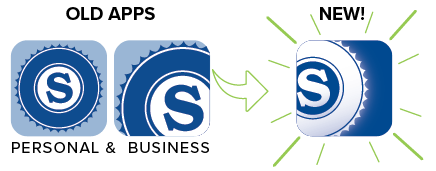
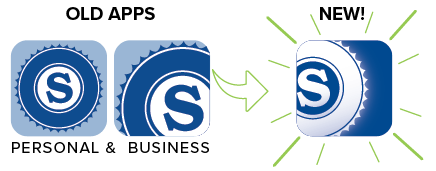
Using the old app | You must download the new app. Be sure the “S” logo on your app is a WHITE “S” logo - that will be the new app. If the "S" logo is blue, go to your app store and search "SNBT" to find the newest app |
Other things to consider | Did you accept the terms and conditions agreement? Did your multifactor code expire after 5 minutes of not being used? Did you use the correct social security number or Tax ID associated? |
When all else fails | We do not want to see you struggle - we want you to enjoy the new experience! Please call us or stop by any office and we would be happy to help. We have extended hours Monday, April 27 through Friday, May 1 we will be here from 8am to 6pm each of those days |
Have a Question?
Feel free to reach out! We're here to help you get on your way to using the new digital experience.
As always, be on the lookout for scams and fraud. Criminals look for any opportunity to take advantage. Be vigilant. If ever you question the legitimacy of a call, email, or text, stop and contact us from a phone number you know to be valid.

Frequently Asked Questions - For Individuals
Reach out if you have other questions - we're here to help!
To help keep your debit card secure, certain PIN number combinations are not allowed. These include simple or easily guessed patterns, such as repeating numbers or number sequences.
Examples of PINs that are not permitted include:
Examples of PINs that are not permitted include:
- Repeating numbers (e.g., 0000, 1111, 2222, 3333, 4444, 5555, 6666, 7777, 8888, 9999)
- Sequential numbers (e.g., 0123, 1234, 2345, 3456, 4567, 5678, 6789, 7890)
- Reverse sequences (e.g., 9876, 8765, 7654, 6543, 5432, 4321, 3210)
Yes. When the new app is released on April 27, download it directly from the App Store or Google Play Store. Both individuals and businesses will use the same App to login, and use a unique username to access each.
No re-enrollment is not necessary if you're an existing digital banking user. Login for the first time using your current username and last four digits of your social security number. Then it will immediately prompt you to change your password. If you use face or fingerprint recognition, you'll initially login with your username but can re-enable these features.
You’ll use the same username for digital banking as you do right now. If you’re currently using face ID or fingerprint ID, you’ll want to ensure you have your username handy for the first login in the new experience. Once you’re logged in the first time, you can reenable face ID or fingerprint ID in the new app. If you’re unsure of your username, contact us ahead of time.
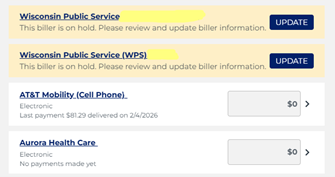
We are aware that this would be an issue. Now that the new system is active, login and go to “Pay a Bill”. Start by reviewing recent payments by clicking “Activity” in the top navigation bar, here you'll see the payments that were completed. To pay a bill click “Pay Bills” and scroll to find the biller, add a payment amount, set the delivery date, and use “Repeats” to schedule recurring payments. If any biller is highlighted in yellow, click “Update” to add biller information. If any biller is yellow, click “Update” to add required biller information before a bill can be paid.
These billers are waiting to be updated. Click “Update” where you will confirm the account number and address of the biller. Once that is complete, you can reschedule the bill to be paid. Prevent bills from being canceled by reviewing all billers and updating those in yellow.
You will need to re-enroll in Zelle through the new mobile app or digital banking and re-add your Zelle contacts before sending money.
Yes your transaction history will carry over. You'll have the same transaction history in the new digital banking experience as you had before.
You can now see your Safe Deposit Box within digital banking. If that is not the account, it is possible you are seeing an account that was previously suppressed from your digital banking view. These are accounts that belong to you but were hidden in the old system. To hide them from view, simply go into the settings for that account and toggle off the account from your view. If you believe an account truly does not belong to you, please contact us immediately.
Statements from approximately September 2025 through April 2026 will not be visible in the new digital banking system until approximately July 2026. This is a known limitation of the data migration process. If you need a copy of a statement from this period before July 2026, please contact us and we can provide one.
Yes. If you’re currently enrolled in eStatements, your first new eStatement will be for April 24-30. In addition to eStatements, we’re introducing electronic documents such as notices and most tax forms.
Your eStatement history will be added shortly after the upgraded experience goes live. In the meantime, you can filter your transaction history by date to find recent activity, or reach out to us anytime if you need a copy of a previous statement.
Yes. This is an important security feature if you transfer money to accounts at other banks. If you previously had external transfers setup, you will have to reestablish those by validating a small transaction between your two accounts.
You will receive two statements for the month of April. The first will arrive by mail and contain all your account history from April 1- 23 and the second will be sent as normal (either mail or electronic) and include account information from April 24-30. You will not be charged extra for these statements.
From the dashboard, click the hamburger menu (three horizontal lines top left corner). This opens a flyout menu – at the bottom of that menu are your initials (or your picture if you added one). Click that circle and the option for “Sign out” will appear. Click it and confirm “Sign Out Now”. You can close that window on your phone.
Yes, new alert options will now be available. Set a different type of alert for each account, customize what activity you’re notified about and whether you receive alerts by email, text, or push notification.
No. You will need to establish new account nicknames, they will be limited to 20 characters. In the new experience, you have the ability to reorder how you see accounts, and show/hide accounts based on your preferences.
You should be prepared to answer a few customer verification questions. Be sure to call from a phone you have on file with SNBT and have your account information handy. Listen carefully to the prompts as the system will sound different with new features and options. You will be asked to create a new 6-digit PIN.
Yes. Rest assured, your data will be transferred safely, and we will continue following all standard security protocols to protect your accounts and financial information. BE AWARE! Scammers often take advantage of transitions like this to send fraudulent emails, texts, or phone calls that appear legitimate. Please stay vigilant and exercise extra care in protecting your sensitive information during this time.
INFORMATION FOR BUSINESSES
The biggest change and some great news: Business users will now sign in through the same login page as consumers, using unique credentials. One convenient starting point means a smoother, more familiar experience every time.
Frequently Asked Questions - For Businesses
No re-enrollment is not necessary if you're an existing digital banking user. Login using your current business online banking username and last four digits of your tax ID number. Then it will immediately prompt you to change your password. If you use face or fingerprint recognition, you'll initially login with your username but can re-enable these features.
Yes. When the new app is released on April 27, download it directly from the App Store or Google Play Store. Both individuals and businesses will use the same App to login, and use a unique username to access each.

If you have outstanding checks dated prior to 12/31/25 those will not carry over. Make a note of these ahead of time and re‑enter these items on April 27 to avoid exceptions and additional review.
Going forward, we will not be sending Analysis statements through the mail, they will arrive within digital banking. Make sure you enroll in eStatements when you are prompted at your first login. You may request a hard copy if you would like.
Due to the transition period, you will receive two statements for April. The first will be produced with information from April 1-23 and another from April 24-30. These will be the plain, black and white data version and may look different than you are accustomed to, but will contain the important details. You will see two fees that are equivalent to what you normally pay. One fee will reflect the fees for April 1-23 and another line item will show the fees from April 24-30.
The new digital experience will require that you make changes to your QuickBooks or Quicken software. Please mark your calendar and take action based on these two important action dates:
Action Date #1: Wednesday, April 22 before 5pm a data file backup and a final transaction download should be completed by this date since transaction history might not be available after the upgrade.
Action Date #2: Monday, April 27 after 8am complete the deactivate/reactivate of your online banking connection to ensure that you get your current Quicken or QuickBooks accounts set up with the new connection.
Action Date #1: Wednesday, April 22 before 5pm a data file backup and a final transaction download should be completed by this date since transaction history might not be available after the upgrade.
Action Date #2: Monday, April 27 after 8am complete the deactivate/reactivate of your online banking connection to ensure that you get your current Quicken or QuickBooks accounts set up with the new connection.
We have some guides that should help you transition your QuickBooks, Quicken, or Mint – follow this link to the guide that provides the download available with step by step instructions: SNBT Guide for QuickBooks, Quicken, and Mint .
Hard tokens (fobs) will no longer be required and will be replaced by other forms of multifactor authentication (MFA). This change enhances security while simplifying access. It provides protection with convenience, allowing you to log in securely without needing a separate token.
User permissions such as who can view, approve, etc. should carry over in the new system as was previously established. As a precaution, we recommend making a note of current user permissions to ensure they are re-established accurately in the new system.
Yes, training will be provided either in person or via self-paced video tutorials. Watch your email for a message from us regarding training. If you do not receive a message, please check your spam folders. You can reach out to us anytime with questions.
Yes your transaction history will carry over. You'll have the same transaction history in the new digital banking experience as you had before.
Yes. Rest assured, your data will be transferred safely, and we will continue following all standard security protocols to protect your accounts and financial information. BE AWARE! Scammers often take advantage of transitions like this to send fraudulent emails, texts, or phone calls that appear legitimate. Please stay vigilant and exercise extra care in protecting your sensitive information during this time.